It happens quite often when you're downloading stuff online that one of your favorite file gets saved with the file type your Windows cannot open as it fails to find the program which has created it.
![]() And to open such a file, either you need to change the file to one of the recognizable formats by one of your programs or allow Windows go online, use the Web service to find the appropriate program. Let's go with the first option and learn how to easily change file formats.
And to open such a file, either you need to change the file to one of the recognizable formats by one of your programs or allow Windows go online, use the Web service to find the appropriate program. Let's go with the first option and learn how to easily change file formats.
How to Change File Types Using Command Prompt:
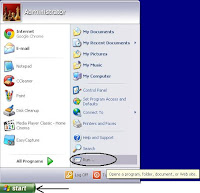
- Click the Windows Start button ► Click Run... on the start menu to open the Run dialog window.