Pages

Showing posts with label Windows. Show all posts

Friday, December 30, 2011

Some more gadgets of 2012

The Dell Peju Windows 8 Tablet


Dell Peju windows 8 revealed pic (may not be accurate)
This is another exciting technology prospect waiting for 2012. Microsoft’s long-time close association with Dell is yet again showing its worth with its new windows tablet. The all new Dell Peju Windows 8 tablet promises to be yet another thumps up to the tablet world.
Rumored Specifications
Windows 7 pro operating system is also compatible with Windows 8

CPU features an Intel Core i5 processor

5 megapixel back camera and 1.3 mega pixel front camera

10.1 inch wide-angle display

Slots or ports with support for two USB, HDMI, audio, Mini VGA, microSD and 3GSIM

5500 mAh battery that supports 6-8 hours battery backups

4GB memory card

Storage capacity of 64-GB or 120-GB SSD

Connectivity : Bluetooth, 4G, 3G, WiFi with b/g

Input systems : Bluetooth, USB keyboard, Stylus and Touch


The Windows 8 and the Speculations Around it

Thursday, December 15, 2011

How to Change File Format in Windows Easily

It happens quite often when you're downloading stuff online that one of your favorite file gets saved with the file type your Windows cannot open as it fails to find the program which has created it.
And to open such a file, either you need to change the file to one of the recognizable formats by one of your programs or allow Windows go online, use the Web service to find the appropriate program. Let's go with the first option and learn how to easily change file formats.


How to Change File Types Using Command Prompt:

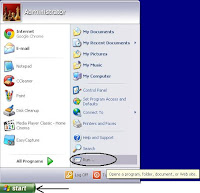
  1. Click the Windows Start button ► Click Run... on the start menu to open the Run dialog window.
    Windows Start ► Run dialog